
Losing your luggage can turn a great trip into a stressful mess. You’ve probably felt that sinking feeling when your bags don’t show up where they should.
But what if you could take control and find your lost luggage quickly? Using an AirTag, you can track your bags and stop worrying about where they might be. You’ll learn simple, step-by-step ways to use your AirTag to locate your missing luggage fast and with ease.
Keep reading, because your next trip could be a lot less stressful.
Credit: www.livenowfox.com
Why Use Airtag For Luggage
Tracking lost luggage can be stressful and time-consuming. Using an AirTag for luggage offers a simple way to keep track of your bags. AirTags connect to your phone and help you find your lost luggage quickly. They work well in crowded places like airports. This makes them a useful tool for travelers who want peace of mind.
Benefits Of Airtag Tracking
AirTags use Bluetooth to send location signals to your phone. This lets you see your luggage on a map in real time. The small size of AirTags means they fit easily inside any bag. AirTags have a long battery life, so they last through many trips. They also work with the Find My app, which is easy to use. This app can alert you if your luggage moves away from you. AirTags help reduce stress by keeping you informed about your luggage’s location.
Comparison With Traditional Methods
Traditional luggage tracking uses tags with barcodes or numbers. These need manual scanning by airport staff. This process can be slow and sometimes inaccurate. Lost luggage may take hours or days to be found. AirTags do not rely on airport staff scanning. They use a network of Apple devices to help locate your bag. This network is large and covers many places worldwide. AirTags provide faster and more precise tracking than traditional tags. They give you control over your luggage’s location anytime.
Setting Up Your Airtag
Setting up your AirTag is quick and simple. It helps you track lost luggage easily. Follow these steps to get started.
Pairing Airtag With Iphone
Bring your AirTag close to your iPhone. Your phone shows a setup screen automatically. Tap “Connect” to start pairing. Follow the instructions on your iPhone. It only takes a few seconds. Once paired, your AirTag links to your Apple ID. This connection helps you find your luggage fast.
Naming And Customizing Your Airtag
After pairing, choose a name for your AirTag. Use names like “Suitcase” or “Backpack.” This makes it easier to identify your item. You can also pick an emoji for quick recognition. Customizing helps you track many items with different AirTags. Save your settings to finish the setup.
Attaching Airtag To Luggage
Attaching an AirTag to your luggage is a smart way to keep track of your bags during travel. The AirTag helps you know where your luggage is at all times. Correct placement and secure attachment are key. This ensures the AirTag stays safe and works well throughout your trip.
Best Placement Options
Choose a spot on your luggage that is easy to reach. Inside a zipper pocket is a good choice. It hides the AirTag but keeps it close to the surface. Another option is to place it inside the main compartment, near the top. Avoid placing it deep inside the bag. This can block the signal and make tracking harder.
Attaching the AirTag to the luggage handle is also popular. It stays visible and easy to check. Yet, it can be removed by others. A better idea is to hide it under a strap or inside a fabric loop. This keeps the AirTag safe and less noticeable.
Securing Airtag For Travel
Use a small pouch or holder designed for AirTags. These holders often come with clips or straps. They help attach the AirTag firmly to your luggage. Avoid loose placement that could cause the AirTag to fall off.
Double-check the holder or pouch before travel. Make sure it is tightly fastened. Wrapping a rubber band around the AirTag and strap adds extra security. This keeps the AirTag from slipping out during handling.
Test the placement by shaking your luggage gently. The AirTag should stay in place. Secure attachment gives peace of mind. You can track your luggage confidently without worry.
Tracking Lost Luggage With Airtag
Tracking lost luggage with AirTag is a simple way to find your bags quickly. AirTag is a small device you can place inside your luggage. It helps you see where your luggage is using your iPhone. This technology makes traveling less stressful by giving you peace of mind.
AirTag works with the Find My network. It uses signals from nearby Apple devices to update your luggage’s location. This network covers many places, increasing the chance of finding your lost luggage fast. Knowing how to use the Find My app and read location updates can help you track your bags easily.
Using Find My App
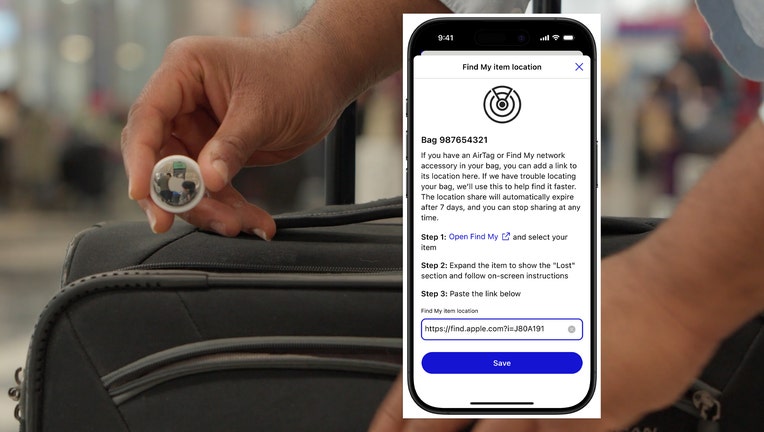
Open the Find My app on your iPhone to start tracking. Tap the Items tab to see your AirTag. The app shows the last known location of your luggage on a map. If your luggage moves, the app updates the location automatically.
You can also play a sound on the AirTag to help find it nearby. The app will guide you with directions if your luggage is close. This feature helps you find your bag in crowded places like airports.
Interpreting Location Updates
Location updates show where your luggage was last detected. A green dot means the AirTag is nearby. A gray dot means the AirTag is out of range or offline. If you see a blue dot, the location is updated by another Apple device.
Use the map to follow your luggage’s movement. The app updates in real time when the AirTag connects with Apple devices. If your luggage is moving, check the map often to track its path.
Tips For Effective Luggage Tracking
Tracking lost luggage with an AirTag works best with some simple steps. These tips help keep your AirTag ready and avoid common problems. Follow these easy rules to find your luggage faster and safer.
Small actions can make a big difference in tracking success. Keep your AirTag in good shape and check it regularly. This helps you stay connected to your luggage wherever it goes.
Keeping Airtag Battery Charged
AirTags use small batteries that last many months. Check the battery level before travel. Replace the battery if it is low. A fresh battery stops tracking from failing.
Remove the AirTag cover to change the battery. Use a standard CR2032 coin cell battery. After replacing, close the cover tightly. This keeps the AirTag safe inside your luggage.
Avoiding Common Tracking Issues
Keep the AirTag inside your luggage, not outside. This prevents loss or damage during handling. Avoid placing it near metal objects that block signals.
Make sure your iPhone or device has Bluetooth and location services on. AirTags need these to work well. Update your Find My app for best performance.
Check the AirTag connection before your trip. This confirms the device is working. If the AirTag does not show on your phone, reset it and try again.

Credit: jumpusapark.com
What To Do When Luggage Is Found
Finding lost luggage can bring great relief after travel stress. Knowing the right steps to take helps you get your bag back fast. Act quickly to avoid delays and confusion. Stay calm and follow clear instructions.
Contacting The Carrier
Call the airline or transport company first. Provide your flight details and baggage claim number. Explain that your luggage has been found. Confirm the location and how to pick it up. Ask about any required documents or fees. Be polite and patient during the call. Keep a record of the conversation for reference.
Using Airtag To Retrieve Luggage
Use the Find My app to locate your AirTag. Check the exact position shown on the map. Share your location with the carrier if needed. Use the app’s directions to reach the luggage spot. Play a sound on the AirTag to find it easily. Keep your phone charged and nearby. Follow any instructions from the carrier carefully.
Privacy And Security Considerations
Using an AirTag to track lost luggage raises important privacy and security questions. Understanding how Apple protects your data helps you use AirTags safely. This section covers key safety features and tips for protecting your personal information.
Airtag Safety Features
AirTags use encryption to keep location data private. Only you can see where your AirTag is. Apple’s Find My network works anonymously, so other users do not know your AirTag’s location.
If an AirTag moves with someone who is not you, it will play a sound after some time. This alert helps prevent unwanted tracking. The AirTag also notifies iPhone users if an unknown AirTag is nearby for a long period.
Protecting Personal Information
Do not share your Apple ID or AirTag details with others. Keep your iPhone and Apple ID secure with strong passwords. Avoid placing AirTags in items that carry sensitive information alone.
Regularly check your Find My app to see where your AirTag is. Turn off the AirTag or remove its battery if you no longer need it. These steps help keep your data safe and your luggage secure.
Credit: techcrunch.com
Alternatives To Airtag For Luggage Tracking
Many travelers want reliable ways to track lost luggage beyond AirTags. Several options exist that offer strong tracking features. These alternatives fit different budgets and travel needs. Choosing the right tool helps reduce travel stress and keeps your bags safe.
Other Gps Trackers
GPS trackers attach to your luggage for real-time location updates. They use satellite signals to show your bag’s exact position on an app. Some devices offer long battery life and worldwide coverage. Many models come with alerts if your bag moves unexpectedly. Choose a tracker with easy setup and clear app controls. Some popular brands include Tile, Tracki, and Jiobit. These devices work well for frequent travelers and those who want precise tracking.
Smart Luggage Options
Smart luggage has built-in tracking technology. These suitcases connect to apps and send location data automatically. Some include extra features like remote locks and weight sensors. Smart luggage often has batteries that charge your phone on the go. These bags reduce the need for separate trackers. Brands like Away and Samsonite offer smart luggage with tracking functions. The price is higher, but the convenience is worth it for many users.
Frequently Asked Questions
How Does An Airtag Help Track Lost Luggage?
An AirTag attaches to your luggage and uses Bluetooth to connect with nearby Apple devices. It sends location updates to your iPhone, making it easy to track your lost bag in real-time through the Find My app.
Can Airtags Work Internationally For Luggage Tracking?
Yes, AirTags work worldwide. They use the global Apple device network to update locations. As long as there are Apple devices nearby, your AirTag’s location will be reported, helping you track your luggage even when traveling abroad.
Is Airtag Tracking Private And Secure?
AirTag tracking is designed with privacy in mind. Location data is encrypted and anonymous. Only you can see your AirTag’s location, and Apple does not store this information, ensuring your luggage tracking remains secure.
What Should I Do If My Luggage Airtag Shows No Location?
If your AirTag shows no location, it might be out of Bluetooth range or has a low battery. Try moving to a populated area with Apple devices or replace the AirTag’s battery to restore tracking functionality.
Conclusion
Tracking lost luggage with an AirTag makes travel less stressful. Attach the AirTag to your bag before you leave. Use the Find My app to see its location anytime. This method helps you act fast if your luggage goes missing.
Stay calm and follow the steps outlined here. Your bag’s safety is easier with simple tracking tools. Keep your travel plans smooth and worry-free. An AirTag offers peace of mind on every trip.