When you’re traveling, your safety should always come first. But how can you stay secure while exploring new places?
The answer is simpler than you might think: travel apps. These handy tools can be your best friend, helping you avoid risky situations and find help quickly if you need it. You’ll discover practical ways to use travel apps to protect yourself, so you can enjoy your trip with confidence and peace of mind.
Ready to make your next adventure safer? Keep reading to learn how.
Credit: www.zazz.io
Choosing The Right Travel Apps
Choosing the right travel apps can greatly improve your safety during trips. Not all apps offer the features you need. Pick apps that provide clear, reliable safety tools. This makes your travel smoother and less stressful. Always check app reviews and ratings before downloading. Choose apps that are easy to use and have good customer support.
Safety Features To Look For
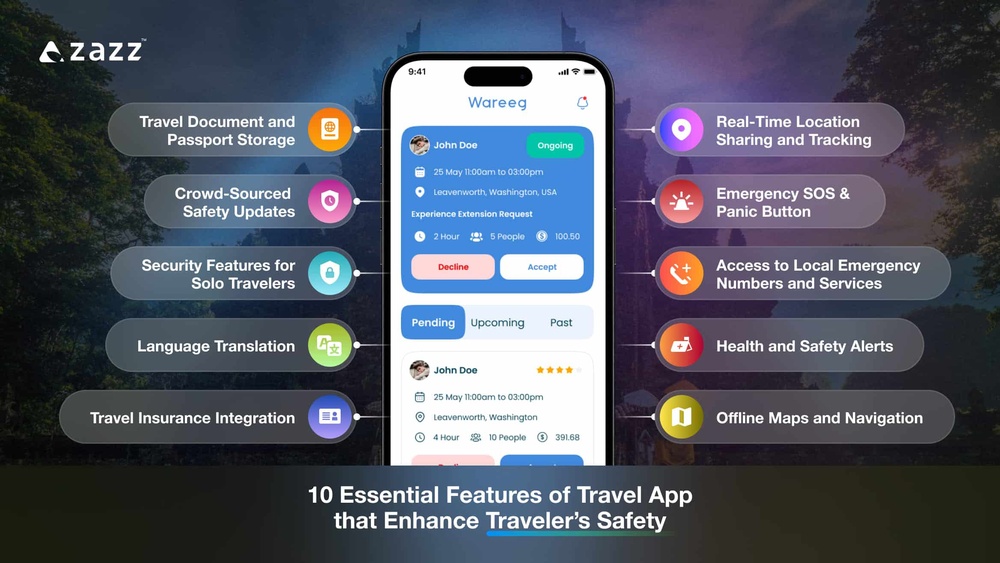
Look for apps with emergency SOS buttons. These allow quick alerts to contacts or authorities. Apps with offline maps help when there is no internet. Check if the app offers travel advisories or alerts. Some apps provide safety tips based on your location. Battery saver modes keep the app running longer. Choose apps that protect your personal data and location.
Top Apps For Emergency Situations
Emergency apps connect you fast to help. Apps like “Red Panic Button” send alerts to chosen contacts. “bSafe” offers live streaming during emergencies. “First Aid by American Red Cross” provides step-by-step medical guidance. These apps work even in remote areas. They can save time and provide peace of mind.
Apps For Real-time Location Sharing
Location sharing apps keep your friends updated on your whereabouts. “Life360” shows your live location to trusted contacts. “Google Maps” allows location sharing for a set time. This helps loved ones know you are safe. Choose apps that share location only with people you trust. Make sure location sharing can be turned off easily.

Credit: sisterhoodtravels.com
Setting Up Apps Before Travel
Setting up travel apps before your trip is key for safety. Proper setup ensures quick help if needed. It also makes your travel smoother and less stressful. Take time to adjust settings and prepare your apps. This simple step can protect you in unfamiliar places.
Configuring Emergency Contacts
Start by adding emergency contacts in your travel apps. Choose people who can help fast. Include family members or close friends. Some apps let you add multiple contacts. Make sure their phone numbers are correct. This helps responders reach your trusted contacts quickly.
Enabling Location Services
Turn on location services in your phone settings. This allows apps to track your position. Emergency responders can find you if needed. Some apps share your live location with contacts. Use this feature for extra security. Keep location services active during your trip.
Downloading Offline Maps
Download offline maps before leaving your home. This helps when internet is slow or unavailable. Offline maps guide you without using data. Save maps for all places you will visit. Check app storage space to avoid issues. Offline maps keep you on track and safe.
Using Travel Apps During Your Trip
Using travel apps during your trip can make your journey safer and smoother. These apps help you stay updated, find your way, and communicate securely. They are easy to use and very helpful in new places. Let’s see how to use them well while traveling.
Staying Informed About Local Conditions
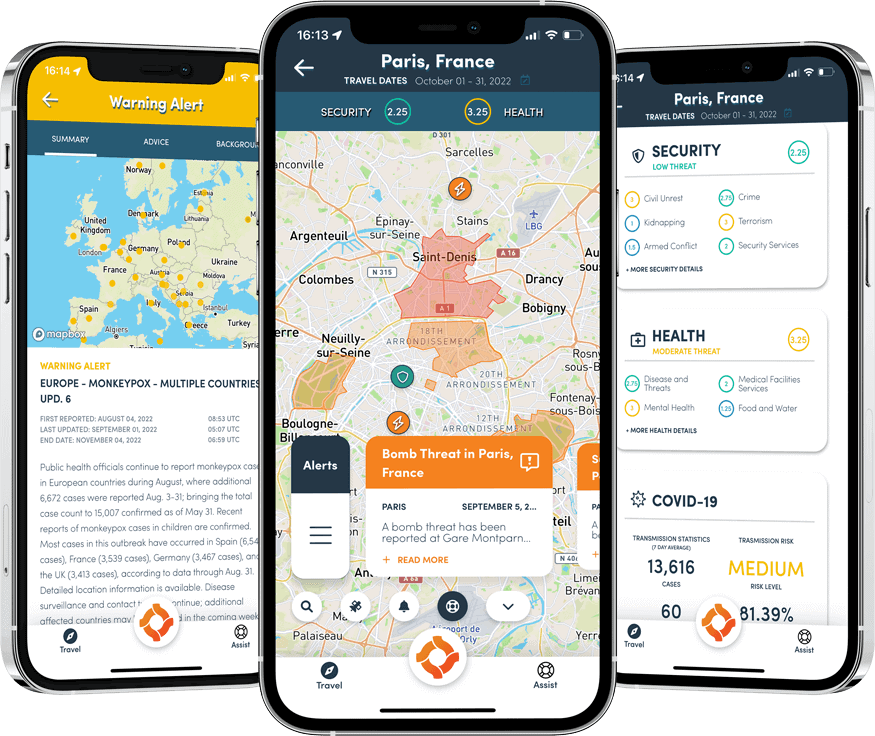
Travel apps give real-time updates about weather and local news. They warn about road closures or strikes nearby. This helps you avoid trouble and plan better. Some apps also show health alerts or safety warnings for tourists. Staying informed keeps you prepared for any changes.
Navigating Safely In Unfamiliar Areas
Maps and navigation apps guide you step-by-step. They suggest safe routes and avoid risky neighborhoods. Voice directions help without looking at your phone too much. Some apps let you share your location with friends or family. This adds a layer of safety when exploring new places.
Using Apps For Secure Communication
Messaging apps with encryption protect your conversations. They keep your information private from hackers. Some apps work even without a strong internet connection. You can quickly contact emergency services or your travel companions. Secure communication is key to feeling safe abroad.
Credit: eccontessa.com
Managing Personal Data And Privacy
Using travel apps can make trips easier and safer. Protecting your personal data and privacy is key. Travel apps often ask for access to your location, contacts, and camera. Sharing too much can put your information at risk. Taking control of your data helps keep your travel secure.
Controlling App Permissions
Check what permissions each app asks for. Only allow access to information the app really needs. Turn off permissions like location or microphone when you do not use them. Adjust these settings in your phone’s privacy menu. This limits data sharing and protects your privacy.
Avoiding Public Wi-fi Risks
Public Wi-Fi is common while traveling but can be unsafe. Hackers may steal your data on open networks. Use a trusted VPN to encrypt your connection. Avoid accessing sensitive apps or making payments on public Wi-Fi. Save important tasks for secure networks.
Regularly Updating Apps
Keep your travel apps updated to protect against security flaws. Developers fix bugs and improve safety in updates. Set your phone to update apps automatically. Outdated apps can make your personal information vulnerable. Regular updates ensure you use the safest app versions.
Handling Emergencies With Travel Apps
Travel apps are very helpful during emergencies. They provide tools that keep travelers safe. Knowing how to use these apps can save time and stress. These features connect you quickly to help and keep your loved ones informed.
Using travel apps for emergencies means you can get help fast. You can contact local police, send SOS alerts, and share your location with trusted people. These options give peace of mind while exploring new places.
Quick Access To Local Authorities
Many travel apps have direct links to local emergency numbers. This helps you call police, fire, or medical services quickly. You do not need to search for numbers or guess the right contact. Just tap and connect for fast help.
Some apps also show nearby emergency centers on a map. This feature guides you to the closest help point. It saves valuable minutes when every second counts.
Using Sos Features
SOS features send an alert with your location to emergency services. You can activate this by pressing a button or shaking your phone. The app sends your exact GPS coordinates immediately.
This feature is useful if you cannot speak or explain your situation. It works even in places where you do not know the language well. The alert reaches responders quickly to get you help.
Sharing Your Location With Trusted Contacts
Travel apps let you share your real-time location with family or friends. They can see where you are during your trip. This helps them check your safety without calling often.
You can set automatic updates or share your location only during emergencies. Trusted contacts receive alerts if you activate SOS. This keeps your support network informed and ready to help.
Tips For Smart And Safe App Usage
Using travel apps can improve safety during your trips. Smart app usage keeps you informed and prepared. Follow these tips to use travel apps wisely and stay safe on the road.
These simple steps help you avoid common problems. They also ensure your devices and data stay secure.
Combining Multiple Apps For Better Safety
Rely on more than one app for safety. Use maps, weather, and emergency alert apps together. This gives a fuller picture of your surroundings. Check travel advisories alongside local news apps. Use location sharing apps to keep friends updated. This mix helps you react quickly to any situation.
Keeping Devices Charged And Ready
Keep your phone and devices charged at all times. Carry a power bank for backup charging. Fully charged devices mean access to help anytime. Turn off unused apps to save battery life. Charge devices before heading out each day. This prevents losing contact or navigation when you need it most.
Backing Up Important Information
Store copies of important documents digitally. Upload passports, tickets, and emergency contacts to cloud storage. Save offline copies on your phone for no internet access. Backups protect your information if devices get lost or stolen. Regularly update backups to keep information current. This step adds a safety net for unexpected problems.
Frequently Asked Questions
What Are The Best Travel Apps For Safety?
Top travel safety apps include TripWhistle, bSafe, and SmartTraveler. These apps offer emergency alerts, location sharing, and local safety updates. Using these apps enhances awareness and helps travelers respond quickly to emergencies, ensuring a safer travel experience.
How Can Travel Apps Improve Personal Safety?
Travel apps provide real-time location tracking, emergency SOS features, and local crime alerts. They help travelers stay informed about risks and quickly contact help if needed. This proactive approach significantly reduces safety risks during trips.
Can Travel Apps Help During Emergencies Abroad?
Yes, many travel apps offer emergency contact numbers, embassy info, and SOS alerts. They connect users to local authorities or trusted contacts swiftly. This support is crucial when facing emergencies in unfamiliar locations.
Are Travel Apps Safe To Share My Location?
Most trusted travel apps use secure encryption to protect your location data. Always review app permissions and privacy policies before sharing your location. Using reputable apps minimizes privacy risks while enhancing your safety.
Conclusion
Travel apps help you stay safe on your trips. They give real-time alerts and important updates. Use maps and emergency contacts for quick help. Share your location with trusted friends or family. Keep your app information updated and check app reviews.
These small steps make travel safer and easier. Stay alert. Stay prepared. Enjoy your journey with peace of mind.