

Are you tired of your phone dying at the worst moments while you’re on the road? Running out of battery can ruin your plans and leave you feeling disconnected.
But what if you could keep your devices powered up longer with just a few simple changes? You’ll discover easy and effective tips to make your battery last throughout your entire trip. Keep reading to learn how to stay charged and stay connected—no matter where your travels take you.
Optimize Device Settings
Optimizing device settings is a smart way to save battery life during travel. Small changes to your phone or tablet can make a big difference. These settings help your device use less power and last longer on the go.
Adjust Screen Brightness
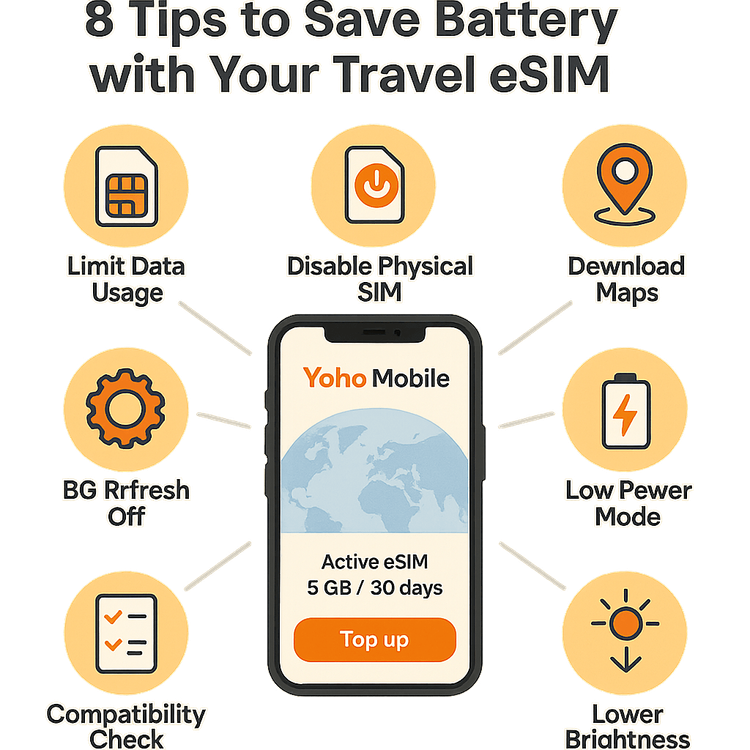
Screen brightness uses a lot of battery power. Lower the brightness to a comfortable level. Use automatic brightness if your device has it. This setting adjusts brightness based on light around you. It helps save energy without making the screen hard to see.
Enable Battery Saver Mode
Battery saver mode limits background activity and reduces power use. Turn it on when your battery is low or you expect no charging soon. This mode often dims the screen and slows down apps. It keeps your device running longer in critical moments.
Manage Background Apps
Background apps drain battery by running without your knowledge. Close apps you are not using. Check your settings to stop apps from refreshing in the background. This reduces power waste and helps your battery last through the day.
Smart Charging Habits
Smart charging habits help keep your device’s battery healthy. This is very important during travel when you need your devices the most. Charging the right way can extend battery life and reduce the chance of problems.
Use Quality Chargers
Always use chargers from trusted brands or the device maker. Cheap chargers can deliver wrong power levels. This can harm your battery or slow charging. Quality chargers protect your device and charge it safely.
Avoid Overcharging
Leaving your device plugged in too long can stress the battery. Once the battery reaches 100%, unplug it soon. Overcharging heats the battery and reduces its lifespan. Set reminders to disconnect your device after full charge.
Charge At Optimal Times
Charge your device when the battery is between 20% and 80%. Charging in this range helps preserve battery health. Avoid letting the battery drain completely or stay full for long. Regular partial charges keep the battery strong for travel.
Carry Portable Power Solutions
Carrying portable power solutions is essential for any traveler. These devices help keep your gadgets charged during long trips. Without access to outlets, portable power keeps your phone, tablet, or camera ready to use. Portable chargers add convenience and peace of mind on the road.
Choose The Right Power Bank
Select a power bank with enough capacity for your devices. A 10,000mAh power bank can charge most smartphones two to three times. Look for one with fast charging features to save time. Compact and lightweight models are easier to carry while traveling. Check if it supports multiple device charging at once.
Use Solar Chargers
Solar chargers are perfect for outdoor trips and areas without electricity. They use sunlight to recharge your devices. Choose a foldable, portable model that fits in your bag. Solar chargers work best in bright, sunny conditions. Keep them in direct sunlight for faster charging.
Pack Extra Cables And Adapters
Carry extra charging cables for your devices. Cables can get lost or damaged during travel. Bring adapters for different plug types if traveling internationally. A universal adapter covers multiple countries. Having spare cables and adapters ensures you can charge anywhere.

Credit: www.dji.com
Limit Power-draining Features
Traveling often means being away from power outlets for long periods. Devices drain battery fast with many features running in the background. Limiting power-draining features helps save battery life. This keeps your phone or tablet working longer during trips.
Adjusting settings can reduce battery use significantly. Focus on turning off or limiting features that use power without much benefit. Simple changes make a big difference in battery performance.
Turn Off Unnecessary Connectivity
Wi-Fi, Bluetooth, and mobile data use battery when active. Turn off these connections when not needed. This stops your device from searching for networks constantly. Airplane mode is useful if you don’t need calls or messages. It saves power by disabling all wireless signals quickly.
Disable Location Services
Apps use GPS to track your location, which drains battery. Disable location services for apps that don’t need it. Check your settings and turn off GPS for non-essential apps. Use location only when you need maps or directions. This reduces background power use and extends battery life.
Reduce Notifications
Notifications wake up your screen and use data to update. Limit notifications to only important apps. Turn off alerts from games, social media, and other non-urgent apps. This reduces battery drain from constant screen activity and data use. It also helps you focus on what matters during travel.
Manage Apps And Media
Managing apps and media plays a big role in saving your phone’s battery while traveling. Apps running in the background use power even if you do not see them. Streaming videos and music can drain the battery quickly. Using offline content helps reduce battery use and keeps your phone ready for important tasks.
Close Unused Apps
Apps open in the background keep using battery power. Close apps you are not using to save energy. Check your phone’s app switcher and swipe away unused apps. This stops them from working quietly in the background. Closing apps improves battery life and speeds up your phone.
Limit Video Streaming
Streaming videos uses a lot of battery because the screen stays bright. It also uses mobile data, which drains the battery faster. Limit how much you stream while traveling. Choose lower video quality to save power. Watch videos only when you have access to charging points nearby.
Use Offline Content
Downloading music, movies, or maps before your trip saves battery. Offline content does not need an internet connection, so your phone works less hard. Use apps that allow you to save content offline. This helps you enjoy media without draining your battery quickly.
Credit: yohomobile.com
Prepare For Emergencies
Preparing for emergencies is key to keeping your devices powered during travel. Batteries can drain fast without warning. Staying ready helps avoid stress and lost connections. Small actions before and during your trip protect your gadgets from dying.
Here are simple tips to prepare your devices for unexpected battery needs. They help extend power and keep you connected when it matters most.
Keep Power Banks Fully Charged
Always charge your power banks before leaving. A full power bank provides backup energy anywhere. Carry more than one if possible. Check their charge level often during your trip. Store them in an easy-to-reach place for quick use.
Use Battery Saving Apps
Install apps that reduce battery drain. These apps close unused programs and adjust settings. Lower screen brightness and turn off background data. Some apps offer one-tap battery saver modes. Use these tools to stretch battery life further.
Know Emergency Charging Spots
Identify places with charging facilities along your route. Airports, train stations, and cafes often have outlets. Carry a list of locations or use maps to find them. Planning stops near charging spots keeps devices ready. Always have your charging cables handy for quick access.
Credit: travelislife.org
Frequently Asked Questions
How Can I Extend My Phone Battery Life While Traveling?
To extend battery life, lower screen brightness and enable power-saving mode. Close unused apps and turn off Bluetooth when not in use. Use airplane mode in areas with no signal to prevent battery drain.
What Are The Best Charging Habits During Travel?
Charge devices partially rather than fully to preserve battery health. Avoid charging overnight or leaving devices plugged in too long. Use certified chargers and cables for safe, efficient charging.
How Do Temperature Changes Affect Battery Performance?
Extreme temperatures, hot or cold, reduce battery efficiency and lifespan. Keep devices in moderate temperatures and avoid direct sunlight or freezing environments to maintain optimal battery performance.
Should I Use Battery Saver Apps When Traveling?
Battery saver apps can help by limiting background processes. However, built-in power-saving modes on devices are often more effective and safer. Use trusted apps cautiously to avoid unnecessary battery drain.
Conclusion
Traveling can drain your devices quickly. Simple habits save battery life. Lower screen brightness and close unused apps. Carry a power bank for emergencies. Turn off Wi-Fi and Bluetooth when not needed. Use airplane mode during long waits. These small steps keep your devices running longer.
Stay connected and enjoy your trip without worry. Battery life matters, so treat it well.